
The Ultimate Autel EVO II Battery Guide
Designed specifically for the Autel EVO II series, the ‘Intelligent Flight Battery’ is a three-cell Lithium Polymer (LiPo 3S) type weighing 365 grams, with a voltage of 11.55v, providing 82 Wh of energy and a capacity of 7100mAh. It can tolerate a maximum of 93 Watts at 13.2V(DC)-5A of charging power. The standard Autel Charger delivers 66 Watts. Charge time is usually no more than 90 minutes to achieve a full charge, and will be shorter if the battery is only partially depleted. Using the Autel Charging Hub, charging four batteries will take approximately 5.5 Hours in sequential mode. Flight time at 100% charge is approximately 34 minutes (rated at 40 minutes flight time, 35 minutes hover time for Evo II Pro, but usually less in actual use). Operating temperature for the battery (and aircraft) is -10ºC (14ºF) to 40ºC (104ºF). Safe battery storage temperature is 14ºF to 86ºF (-10~30ºC), at 65±20%RH (relative humidity). Ideal storage temperature range is 71.6ºF to 82.4ºF (22C-28ºC) or room temperature.
Valid Autel Battery Part Numbers: XE3-7100-1155 or GE3-7100-1155
WARNING: To avoid warranty problems, limit your use of non-Autel, aftermarket batteries to the activities defined at the bottom of this page. See the section titled What About Non-Autel, Aftermarket Batteries?
If you are unable to resolve your battery issue after reviewing and following the prescribed steps on this page, your safest path to resolution is to recycle and replace the battery, or return it to the seller for replacement if within its return period, or submit a repair order to Autel if under warranty.
Additional Resources:
Autel Intelligent Flight Battery Guide & Safety Guidelines
Autel Charging Hub User Manual
Battery Warranty
Your battery is backed by 30 Days REPLACEMENT or FULL REFUND from date of purchase, plus is warranted to be free from defects for 12 Months of from the date of purchase. A defective battery will be repaired, or replaced (with new or refurbished parts or products) at the Company’s option, with Proof of Purchase, without charge for parts or labor directly related to the defect(s). A dated invoice is required as proof of purchase to submit a claim, PLUS the total battery charge cycles must be lower than 200 charges (100 charges for refurbished batteries). There are other limitations and exclusions to the warranty, including no warranty coverage if the battery is charged using anything other than a Autel authorized charger, so refer to the Autel warranty coverage for more information.
Battery Lifespan
In general, with proper battery care and following recommended storage and charging procedures, you can expect that a single Autel EVO II series battery will last approximately 300-400 charge cycles, or approximately two years on average. Of course, the more you fly and recharge, or fly in extreme cold or hot temperatures or high winds, the sooner you will need to replace your battery. Likewise, the longer you store your battery, the more likely it is to have a shorter lifespan. General warning signs of reduced battery life are indicated by faster than normal discharging during use (shorter flight times or rapid drops in percentage), physical swelling that makes insertion or removal difficult, or repeated occurences of battery error LED indicators as described below. If you encounter these warning signs, you should land immediately, replace the battery to continue flight, then retire and recyle the problem battery. We recommend retiring and recycling all batteries after three years of life, regardless of performance or usage.
Things to Remember
- Never insert a battery into or remove the battery from the aircraft when the battery is turned on.
- Always fully charge a new battery before using it for the first time.
- Ensure the battery is firmly mounted into the EVO II chassis. Both the left and right side clips must be fully engaged. The aircraft will not take off if the battery is mounted incorrectly and this condition is detected. If mounted loose but connected at the pins it may simply disengage during flight resulting in power loss and aircraft damage or loss.
- In cold conditions, insert the battery into the Autel EVO II and turn on the aircraft for approximately 1-2 minutes to warm up the battery before taking off, or warm up the battery prior to insertion.
- Battery power is significantly reduced, and flight times are significantly shorter, when flying in cold temperatures, especially below 32ºF or 0ºC. Flights should be ended as soon as a "Low Battery Level" warning is displayed, especially when flying in colder temperatures.
- Batteries will not charge if too cold (below 32ºF or 0ºC) or too hot (above 104ºF or 40ºC).
- Allow batteries to cool before storing for an extended period, and avoid exposing them to heat above 104ºF or 40ºC.
- Never use a battery that has been dropped or been involved in a crash, and never use a swollen, punctured, leaking or damaged battery. Discard and recycle it.
- Never run down a battery to below 5% power.
- Autel's battery guide recommends a saltwater immersion method to deal with a battery that leaks, smokes, or starts to swell substantially. DO NOT USE THE SALTWATER IMMERSION METHOD UNLESS THE BATTERY HAS BEEN COMPLETELY DISCHARGED (0.0 V) AND YOU HAVE EXHAUSTED ALL OTHER METHODS. SALWATER IMMERSION IS A VERY DANGEROUS METHOD. See this page for more information about the dangers and risks.
Battery Features
- Onboard Battery Power Level Indicators: The battery LED indicators display the current battery level. Refer to the chart below to view indicator levels.
- Auto-Discharge Function: To prevent battery damage and swelling, the battery automatically discharges to below 65% of total power when idle for more than ten days, or the number of days specififed in the Autel Explorer app. It takes about two to three days to discharge the battery to 65%, and it is normal to feel moderate heat being emitted from the battery during the discharge process.
- Balanced Charging: The battery automatically balances the voltage of each cell when charging.
- Overcharge Protection: The battery automatically stops charging when the battery is fully charged. Generally, charging can only begin when the battery charge drops below 90% power. LED3 blinks twice per second when on the charger and an overcharge condition is detected.
- Temperature Protection: The battery will only charge when the temperature is between 5ºC (41ºF) and 40ºC (104ºF). LED4 blinks twice per second when the internal battery temperature is too low, and LED4 blinks three times per second when the internal battery temperature is too high.
- Over Current Protection: The battery stops charging or will refuse to charge when a high amperage of more than 8 amps is detected. LED2 blinks twice per second when on the charger and an over current condition is detected.
- Over Discharge Protection: Always stop using your Autel EVO II battery when there is only one flashing light displayed. You should fully recharge the battery before using again. Never discharge your Autel EVO II battery below 3% power, and generally avoid below 8% power. Repeated discharges below 10% weakens and can damage your costly battery. As a rule, LiPo batteries should never be discharged below 3.0V/cell, or or they may be permanently damaged. The Autel EVO II battery contains 3 cells at 4.4V each, so 9.0V (3.0V x 3 cells) is the minimum recommended discharge voltage level.
- Short Circuit Protection: The battery will automatically cut the power supply when a short circuit is detected. If you receive a short circuit battery warning during flight or prior to takeoff, you should land as quickly as possible and exchange the battery. A short circuit warning can be triggered by bent prongs on the battery connection, or by frayed wires in the charger if charging, but it may also indicate a serious internal problem with the battery. If encountered during charging, try a different charger. Generally, unless covered under warranty, you should discard and recycle the affected battery if a short circuit warning is indicated.
- Battery Cell Damage Protection: The Autel Explorer app will display a warning message when a damaged battery cell is detected. Generally, this condition is triggered if there is a difference of .1 volts (that's only 1/10th of a Volt) between any of the three cells in the battery. Differences in thousandths of Volts between cells is normal. Generally, unless covered under warranty, you should discard and recycle the affected battery if a battery cell damage warning is indicated.
- Sleep Mode: To conserve power and reduce battery damage due to full discharge, when the battery level is low, the battery will enter sleep mode and turn off. To wake up the battery, you must connect it to a charger.
- Power Saving Mode: After 30 minutes of inactivity the battery will enter power save mode and turn off. Simply turn on the battery when ready. If the battery does not turn back on, you likely encountered Sleep Mode (see previous item) and will need to connect the battery to a charger to wake it back up.
- Battery Metrics Communication: Information pertaining to the battery's voltage, capacity, current, total number of times charged, etc. is transmitted to the aircraft's main controller and is viewable in the Autel Explorer app.
Understanding the Battery LEDs (see more about error LEDs below this section)
 |
 |
Turning the Battery On & Off
Turning On: Press the power button and hold for three seconds to turn on. The battery's power level LEDs will display the current battery power level.
Turning Off: Press and hold for three seconds to turn off. If the battery is attached to the aircraft, LED 1 and LED 4 will flash five (5) times during the power down phase. If not attached to the aircraft, the battery power level LEDs will fully illuminate during the power off cycle. Once fully off, the LEDs will no longer be lit.
Checking Battery Power Level
If not in use, simply press the battery power button once to view the current battery power level. If already on, the battery power level will be constantly displayed. See the visual guides above to understand what the LED's mean.
Charging the Intelligent Flight Battery
- Connect the Autel Battery Charger to a power source (100-240V 50/60Hz).
- Connect the Intelligent Flight Battery to the Autel Battery Charger to start charging.
- The Battery Level Indicator will display the current battery level as it is charging. See the chart below for guidance.
- The Intelligent Flight Battery is fully charged when the Battery Level Indicators are all off.
Battery Power Level While Charging
The Battery Level Indicator will display the current battery charging level as it is charging. Refer to the chart below to understand what the LED's mean.
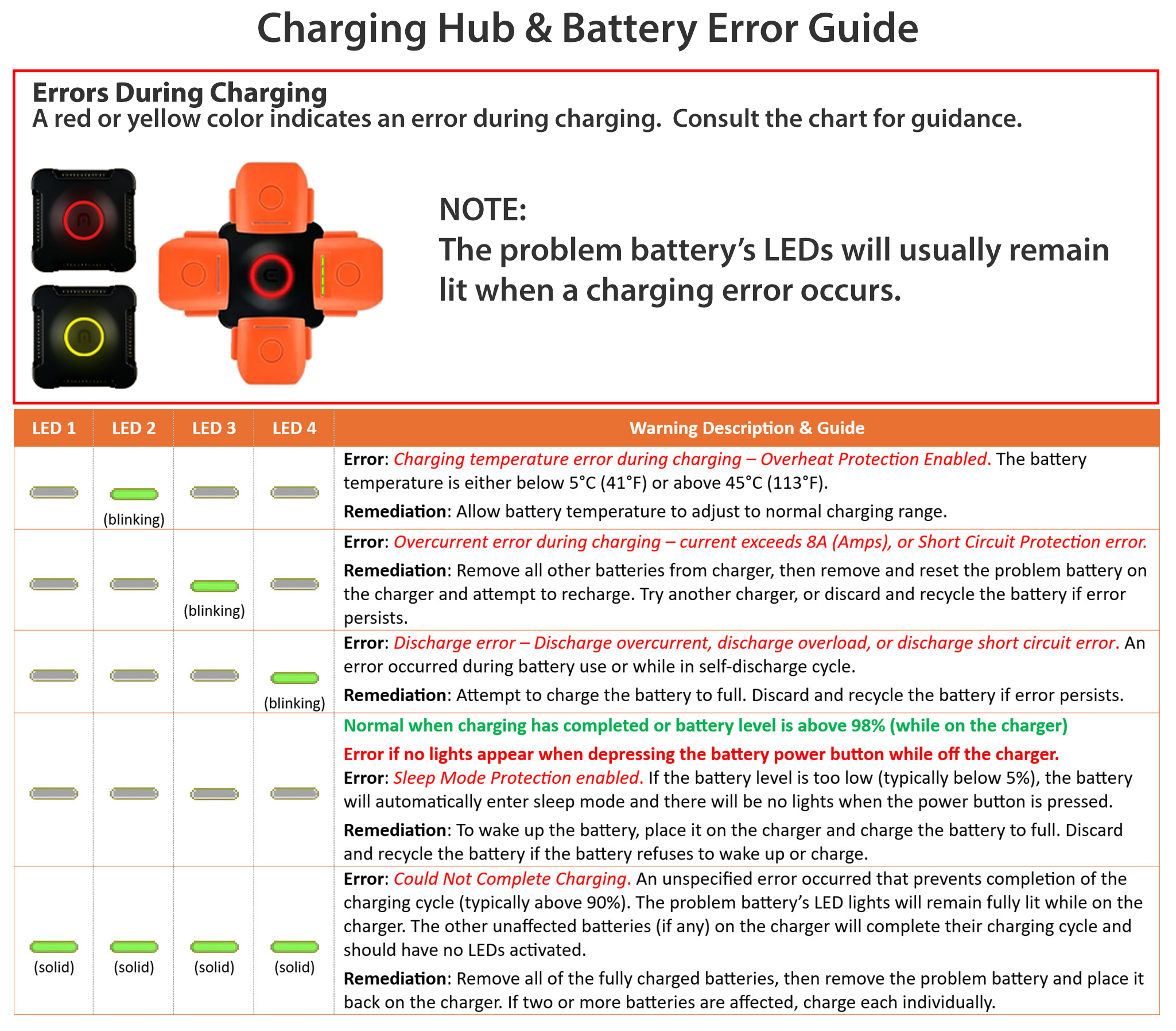
Battery Fault Indicators - Battery Protection LED Display
The table below shows the battery protection indicators and corresponding LED patterns that may occur during charging. If these occur during charging, a fault is indicated. To attempt to resolve view the Battery Troubleshooting section below.
How to Discharge Your Intelligent Flight Battery
Slow Method: Place the Intelligent Flight Battery into the aircraft battery compartment and turn it on. Turn on the Autel Explorer app and monitor battery level on the main page. Leave the aircraft on until there is less than 8% power left, or until the battery can no longer be turned on.
Rapid Method: This is the riskier method since it involves pushing your battery power to levels below the minimum for safe flight. To use power more rapidly, fly your Autel EVO II until there is 10% of power left, then land and continue to leave the aircraft powered on until the battery power percentage reaches 5%, or until the battery can no longer be turned on after landing.
Battery Storage
The Intelligent Flight Battery is programmed to automatically discharge down to the optimum storage level (about 60% power) after being left unused based on the number of days specified in the "Time to Discharge" setting in the Autel Explorer app. The default setting is six (6) days. You may specify a range up to ten (10) days. Please be aware that this value reverts back to six (6) days after firmware updates. The battery discharge cycle takes 2-3 days to complete. During the discharge cycle, a battery will feel moderately warm to the touch. This is normal. Remember that pressing the battery power button at any time during the discharge process will cancel the auto discharge process and make your batteries wait the defined number of days before attempting to discharge again.
Batteries should never be stored for an extended period of time while mounted in the aircraft. Batteries that will be stored for an extended period of time should be monitored monthly to manage proper charge levels for storage. When you press the battery power button, the 2nd or 3rd battery light (LED2 or LED3 as shown above) should either be solid or blinking. If LED1 is blinking or solid, the battery should be charged back up to the optimum storage level. Simply charge it until the 3rd battery light (LED3) starts blinking then store the battery. Charging beyond 60% will result in the automatic discharge process being triggered again while in storage, so there is no need to fully charge the battery. It is best to store batteries at room temperature, rather than in an attic, garage, or vehicle where temperature extremes may be encountered.
Battery Sleep Mode Protection
The Intelligent Flight Battery will enter Sleep Mode Protection mode if power falls below 5% and if stored for an extended period of time. This is designed to prevent full depletion of the battery which can damage the battery's LiPo cells. When in Sleep Mode mode, if you try and power on the battery, the power level LEDs will remain off. Connect to a charger and recharge the battery to bring it out of Sleep Mode. This recharge process may take longer than normal, so be patient. If the fault continues after these measures, you will need to submit a repair order to Autel if under warranty, or discard the battery by recycling it and replace it with a new battery.
Battery Troubleshooting
Inconsistent Firmware Message in Autel Explorer App
If you receive a notification in the Autel Explorer app that you have inconsistent firmware, you will need to update the aircraft firmware from within the Autel Explorer app, or use the methods outlined in the Autel online guide How to Upgrade Firmware on your EVO II. The battery does contain firmware, but there is no direct means to update its firmware other than updating the aircraft firmware. While you may be able to fly in spite of receiving this message, please be aware that flight times may be significantly decreased until resolved. Additionally, if you own two different models from the Autel EVO II series and you use their batteries interchangeably, you may get an inconsistent firmware notification each time you switch a battery from the one drone to the other. To avoid this, dedicate batteries to each aircraft model, if possible.
Battery Overcurrent During Discharge Warning in Autel Explorer App
This condition is most often triggered when flying in Sport mode while being aggressive with your throttle and stick movements. This can also occur during flights in high winds where high throttle and excessive pitch are often required to maintain a heading, especially into the wind or crosswind, as well as during flights in 100+ degrees Farenheit (> 40°C). Repeated error notifications of this type should not be ignored. It is recommended to alter your flight behavior to reduce excessive stick and throttle movements. If the notifications continue during your flight you should land as soon as possible. Usually, a firmware update may fix this issue if recurring without excessive stick movements. If an update is available in the Autel Explorer app, you can land and install the update.
Battery In Hibernation Mode - No Lights On Battery When Power Button is Pressed
Intelligent Flight Batteries are designed to retain some charge which helps avoid irreversible errors when discharging a battery. If a battery is depleted below 5% and stored for a long period, the battery will enter Sleep Protection Mode to protect the battery. Batteries shipped from Autel may arrive in Sleep Protection Mode, and generally all you have to do is connect them to the Autel charger to wake up the battery. If the fault continues after these measures, you will need to submit a repair order to Autel if under warranty, or discard and recycle it and replace it with a new battery.
Battery In Low Charge Mode - LED1 Blinks Rapidly When On Charger
Intelligent Flight Batteries retain some charge which helps avoid irreversible errors when discharging a battery. When a battery is in a low charge mode, it is normal for LED1 to blink rapidly when placed on the charger. Once the charge exceeds 25% and LED2 starts to blink, the blink rate of LED1 will slow.
Battery Cell Damage Detected - Mission Critical Error
The Autel Explorer app will display a warning message when a damaged battery cell is detected. No cell damage is detected while the battery is charging. Generally, this condition is triggered if there is a difference of .1 volts (that's only 1/10th of a Volt) between any of the three cells in the battery. Differences in thousandths of Volts between cells is normal. To check the battery cell health on your Intelligent Flight Battery, plug the battery into your aircraft, power on the aircraft controller, then power on the aircraft, then open up the Autel Explorer app and go to Settings > Battery Settings to view the aircraft battery information. The battery voltage for each cell should be almost identical across all three cells. For instance, Cell1=4.25V, Cell2 = 4.25V, Cell3=4.26V indicates good battery health, even though Cell2 and Cell3 show voltage .01 higher than the first cell. Conversely, Cell1=4.15V, Cell2 = 4.25V, Cell3=4.26V indicates a damaged cell in Cell1, since it's voltage is at least .1V different than the other cells. Generally, a damaged cell is a condition that cannot be remedied by any end-user. Unless covered under warranty, you should discard and recycle the affected battery if a battery cell damage warning is indicated. If the fault continues after these measures, you will need to submit a repair order to Autel if under warranty, or discard by recycling it and replace it with a new battery. Never fly your aircraft using a battery that has displayed a battery cell damage error, even if fully charged.
Short Circuit Detected - Mission Critical Error - LED4 Blinks Three Times Per Second When On Charger
The battery stops charging or will refuse to charge when a short circuit fault is detected. LED4 blinks three times per second when a short circuit condition is detected. If you receive a short circuit battery warning during flight or prior to takeoff, you should land as quickly as possible and exchange the battery. A short circuit warning can be triggered by bent prongs on the battery connection, or by frayed wires in the charger if charging, but it may also indicate a serious internal problem. Before attempting to charge a battery with a short circuit detected, first inspect your unplugged charger and charging cord for any frayed, damaged or exposed wires or cracks in the charger body. If any such damage is found, use a different charger. If the charger is in good working order, unplug the battery from the charger and plug it back in to see if the condition resolves. If the fault continues after these measures, you will need to submit a repair order to Autel if under warranty, or discard and recycle it and replace it with a new battery. Never fly your aircraft using a battery that has displayed a short circuit error that cannot be resolved, even if fully charged.
Over Current Detected - High Amperage Fault - LED3 Blinks Twice Per Second When On Charger
The battery stops charging or will refuse to charge when a high amperage of more than 8 amps is detected. LED3 blinks twice per seconds when an over current condition is detected. To attempt to resolve, unplug the battery from the charger and plug it back in to see if the condition resolves. If the fault continues, try a different charger and outlet. If the fault continues after these measures, you will need to submit a repair order to Autel if under warranty, or discard and recycle it and replace it with a new battery.
Over Charge Detected - LED3 Blinks Twice Per Second When On Charger
The battery automatically stops charging when the battery is fully charged. Generally, charging can only begin when the battery charge drops below 90% power. LED3 blinks twice per second when on the charger and an overcharge condition is detected. To attempt to resolve, unplug the battery from the charger and plug it back in to see if the condition resolves. As a next step, discharge the battery to below 50% and then recharge. If the fault continues, try a different charger and outlet. If the fault continues after these measures, you will need to submit a repair order to Autel if under warranty, or discard and recycle it and replace it with a new battery.
Over Voltage Charger Detected - LED3 Blinks Three Times Per Second When On Charger
This error is best expressed as an "Over Voltage Charge Detected". The battery automatically stops charging when the battery is fully charged. The Autel chargers prevent over-voltage conditions, as do most third party chargers. If during the charging cycle your battery stops charging and the LED3 blinks three times per second, your battery likely experienced an over voltage charge in one or more cells of the battery. It is advised to plug the battery into your EVO II, then turn first on the controller, followed by your mobile display or tablet, then the aircraft and open the Autel Explorer app and navigate to the Settings panel, select the Aircraft Battery tab and review the battery voltage readings. You will likely see one or more cells reading slightly higher than the others. If the readings are different by .01-.07 Volts then the condition will likey be corrected by discharging and re-charging the battery. Higher differences likely indicate a bad cell condition is about to occur. To attempt to resolve, unplug the battery from the charger and plug it back in to see if the condition resolves. As a next step, discharge the battery to below 80% and then recharge. If the fault continues, try a deeper discharge to below 50%, and then recharge. If the fault continues, try a different charger and outlet. If the fault continues after these measures, you will need to submit a repair order to Autel if under warranty, or discard and recycle it and replace it with a new battery.
Battery Will Not Charge - Battery Temperature Fault - LED4 Blinks When On Charger
The Intelligent Flight Battery will only charge if the temperature of the battery itself is between 5ºC (41ºF) and 40ºC (104ºF), and the Autel Charger will only function if its temperature is within 5ºC (41ºF) and 40ºC (104ºF). LED2 blinks twice per second when the internal battery temperature is too low, and LED2 blinks three times per second when the internal battery temperature is too high. Either warm the battery or charger, or cool the battery or charger, as needed to enable charging. Allowing a battery to return to room temperature will generally fix this issue. If the fault continues after these measures, you will need to submit a repair order to Autel if under warranty, or discard and recycle it and replace it with a new battery.
Final Thoughts...
Faulty or damaged charger. Check for a burnt smell coming from the charger, which may indicate a short circuit or burnt component. Try a different charger.
Damaged or bent pins on the charger cable or in the aircraft battery chamber. Pins that are damaged, bent, or corroded will prevent charging or power from flowing. Make certain the female pin elements are clean, not bent or filled with debris. Never carry a battery in your pocket or in a container where pins could become shorted out.
Loose connections could also be to blame for your battery problem. Make certain that connections are solid and the battery is fully secure in the battery compartment.
Damaged battery. The shell of the battery must be intact for safe battery use. Never use a battery that has been dropped or been involved in a crash, and never use a swollen battery. Damaged batteries are generally not covered by the standard Autel warranty, unless they arrive that way in your original shipment. Damaged batteries should be discarded, recycled, and replaced with a new battery.
What About Non-Autel, Aftermarket Batteries?
Never use a non-Autel battery for drone flights. They are fine for ground activities such as gimbal calibrations, IMU calibrations, compass calibrations, firmware updates, or powering ancillary devices or charging your controller in the field when using a special cable designed for this purpose. For flights, only use an original equipment, Autel manufactured, Autel Intelligent Flight Battery, part number XE3-7100-1155 or GE3-7100-1155. Flights made with a non-Autel battery that result in a crash will void the aircraft warranty, including coverage under Autel Robotics Care and Autel Robotics Care Premium.
Fly safe!